Notifications, Audit & Reports
This page covers the four oversight surfaces that sit on top of everything else in ShiftPilot: the notification
center and subscription manager (/notifications), the audit trail (/audit), the built-in report catalog
(/reports), and the ad-hoc data export / report builder (/data-export). All four are read/reporting surfaces
— nothing here edits a schedule, a credential, or a person — but together they're how anyone with oversight
responsibility (an admin, a scheduler, an on-call coordinator, or an auditor) answers "what happened, who did it,
and how are we doing."
Why these are complete, not best-effort
Two shared library functions sit underneath this whole page, and it's worth understanding them before the UI, because they're the reason the audit log and notifications are trustworthy rather than something every module has to remember to wire up:
writeAudit()(src/lib/audit.ts) is the single write path for the audit trail. Every mutation across every module — assignments, credentials, availability, time-off, swaps, punches, on-call, permissions — calls this one function instead of writing to theAuditEntrytable directly. That means the audit log is complete by construction: there's no module that could quietly skip logging, because logging isn't optional plumbing bolted onto each feature, it's the same function call everywhere.notifyEvent()(src/lib/notify.ts) is the matching fan-out for notifications. Any code path that fires a domain event (a shortage created, a credential expiring, a swap approved) callsnotifyEvent()with an event type and optional scope; it looks up every matchingNotificationSubscription, writes aNotificationrow per recipient/channel, and — for email/push/SMS — hands off to delivery.
Both are described in more detail in Getting Started.
Notifications
/notifications has two tabs: Inbox (your notification history) and Subscriptions (what you get notified
about, and how).
Inbox
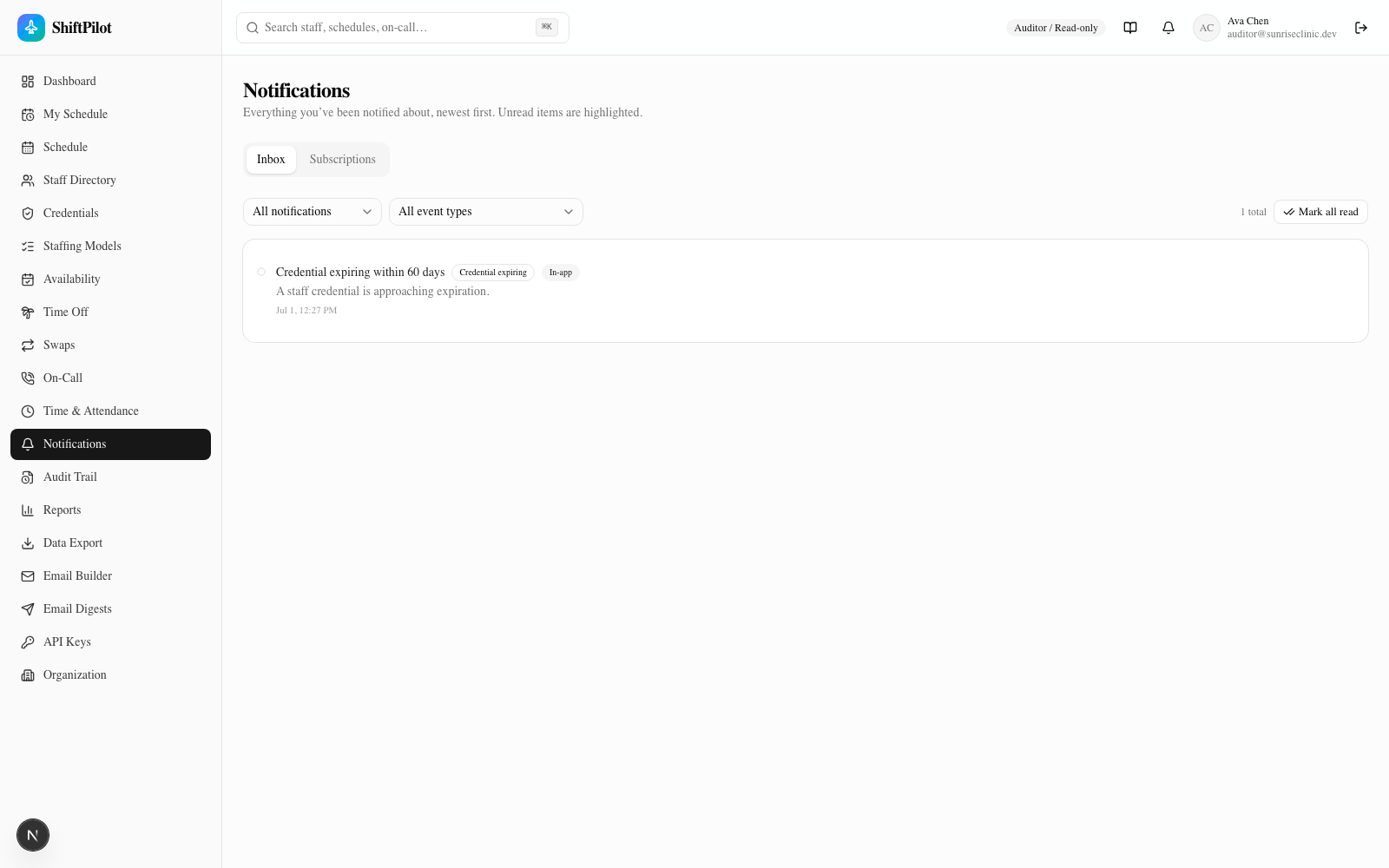
Every notification you've received shows up here, newest first, regardless of channel — including ones that were also emailed or pushed. Unread items are highlighted; clicking one marks it read and, if it links to something (an assignment, a shortage, a credential record), navigates you there. Two filters narrow the list: read status (all / unread / read) and event type (the same catalog used by subscriptions, below). A Mark all read button clears the unread count in one action, and the list paginates at 25 rows.
Subscriptions
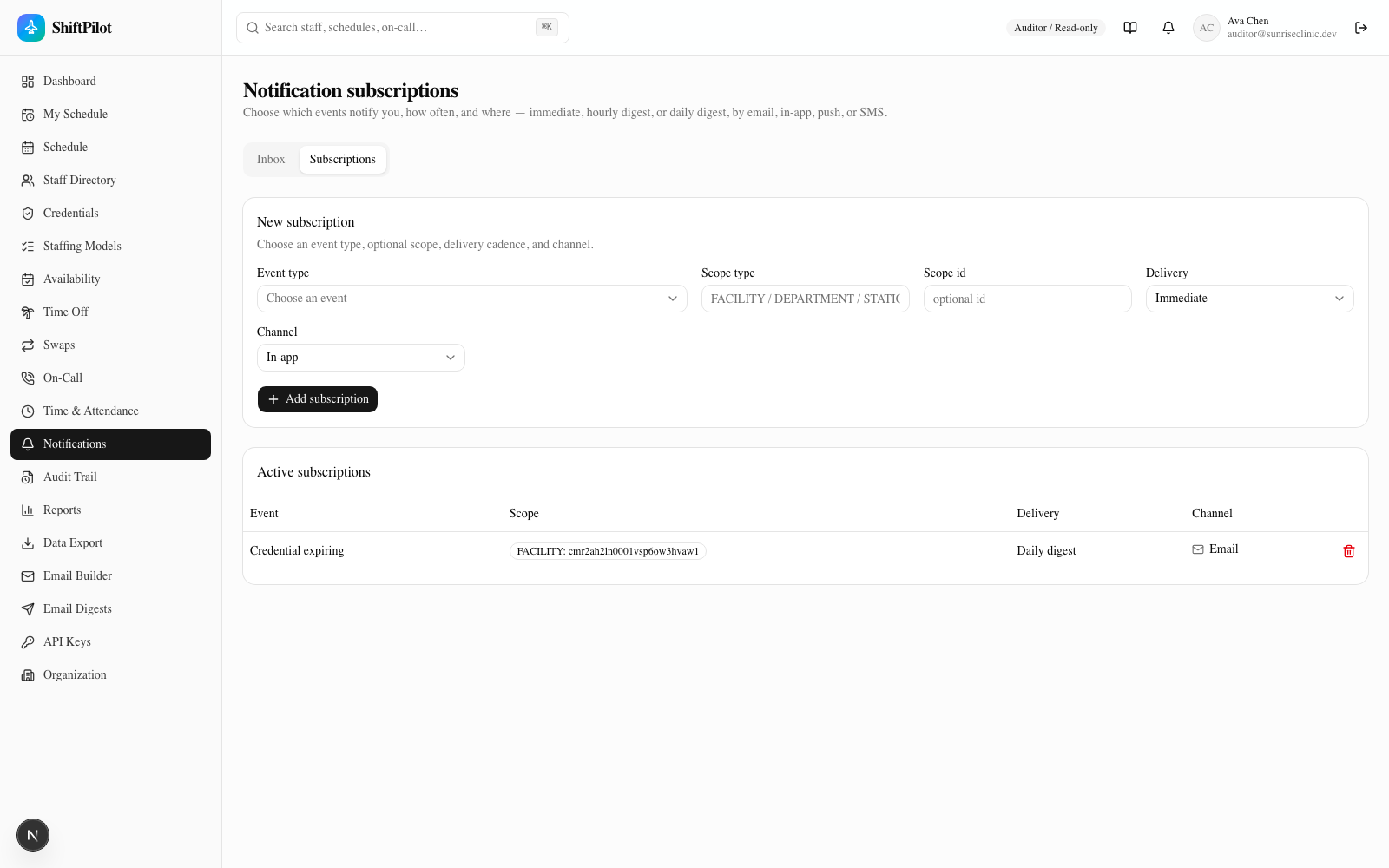
A subscription is event type × scope × delivery mode × channel:
- Event type — the subscribable catalog (
src/components/notifications/event-catalog.ts), grouped into: schedule changes (assignment added/edited/removed/moved, open shift created/filled), availability added/removed, time-off submitted/approved/denied/canceled, swap submitted/approved/denied/canceled, coverage shortage created/cleared, competency-violation override, credential expiring/expired, on-call gap, on-call swap, attendance exceptions (call-off/late/no-show), and report-ready. - Scope — optional. Leave it blank for "every event of this type, org-wide," or set a scope type
(
FACILITY/DEPARTMENT/STATION) and id to only hear about that part of the org — e.g., "coverage shortages, but only for the ED" rather than every station everywhere. - Delivery mode — Immediate (fires as soon as the event happens), Hourly digest, or Daily digest, so high-volume subscriptions don't flood you one notification at a time.
- Channel — In-app, Email, Push, or SMS. Every channel writes a
Notificationrow (so it always shows up in your inbox and delivery log regardless of channel); Email/Push/SMS additionally attempt outbound delivery.
Admins get an extra control at the top of the page: a user picker that lets them configure subscriptions on behalf of anyone, not just themselves — useful for setting up a facility admin's shortage alerts without asking them to do it themselves. Non-admins only see and manage their own subscriptions.
Deleting a subscription removes it immediately (no confirmation) — the table refreshes to reflect it.
A note on delivery
This is a local-dev app with no real SMTP/SMS/push provider wired in. Email, SMS, and push notifications are
simulated: the Notification row is still created (so the inbox, delivery log, and "email me on X"
subscriptions all behave correctly end-to-end), but the actual outbound message is logged to the server console
([notify:email] ...) instead of really being sent. This mirrors the same simulated-send pattern used by the
weekly digest and clinic-snapshot emails — see Email, Calendar & API for how to point
it at a real SMTP server.
Audit Trail
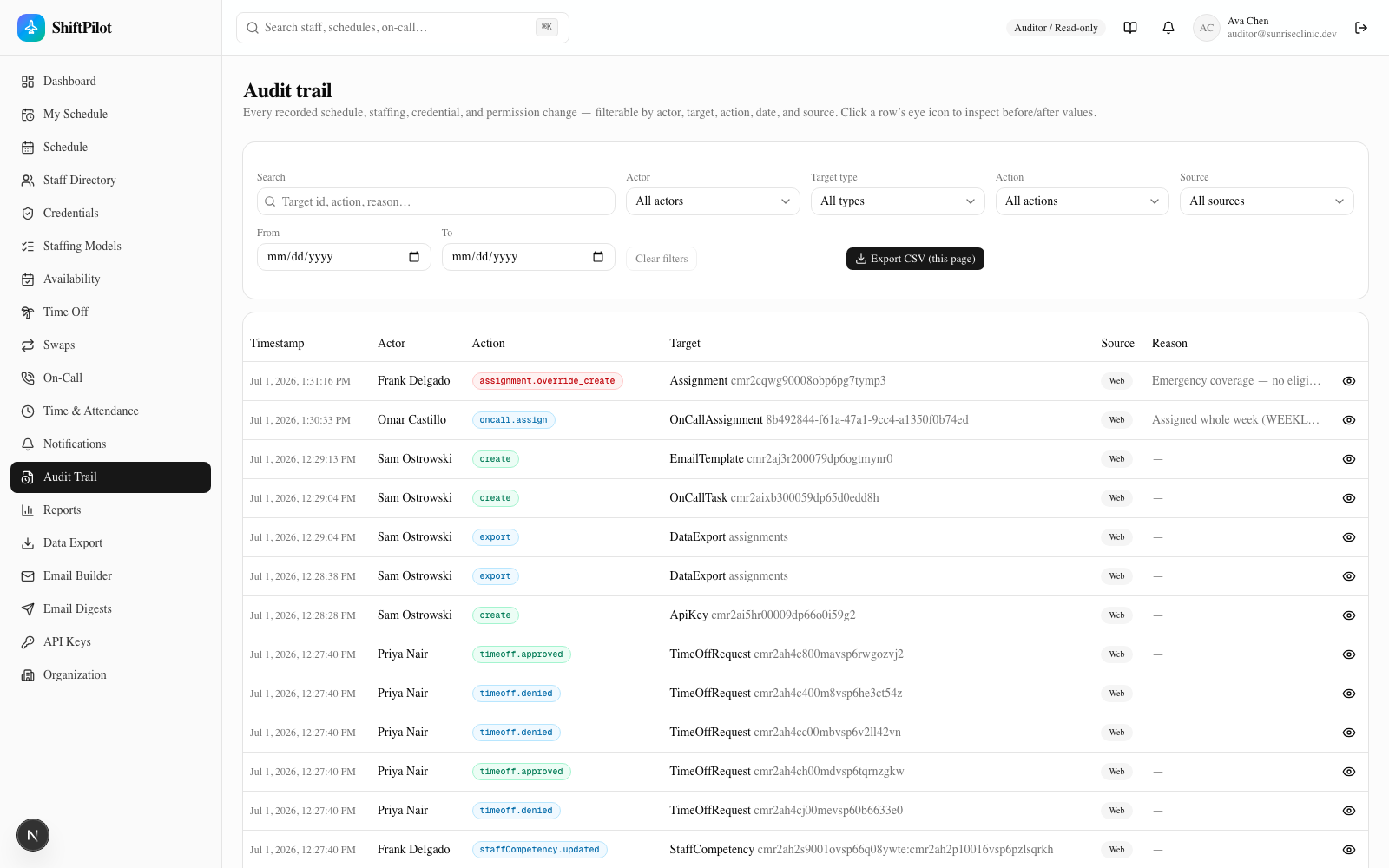
/audit is the browsable, filterable view over every row writeAudit() has ever written. Because that's the
single write path described above, this page isn't a "sample" of what happened — assignment overrides, credential
changes, availability edits, time-off decisions, swap approvals, punch edits, on-call changes, and permission
changes are all in the same table, actor-attributed, with a before/after value and a reason where one applies
(overrides, call-offs, removals).
Filters, all combinable:
| Filter | What it narrows |
|---|---|
| Search | Free text against target id, action, and reason |
| Actor | The user who performed the action (or "System / automated" for entries with no actor) |
| Target type | The entity that was mutated — Assignment, StaffCompetency, TimeOffRequest, OnCallAssignment, ApiKey, etc. |
| Action | The specific action string, e.g. assignment.override_create, timeoff.approved, oncall.assign |
| Source | Web, Mobile, API, Integration, or Automated |
| From / To | Date range on the entry timestamp |
Action badges are colored by category (green for create-like actions, blue for updates, red for delete/override/deny/cancel-like actions) so a scan down the table shows risk at a glance.
Before/after viewer
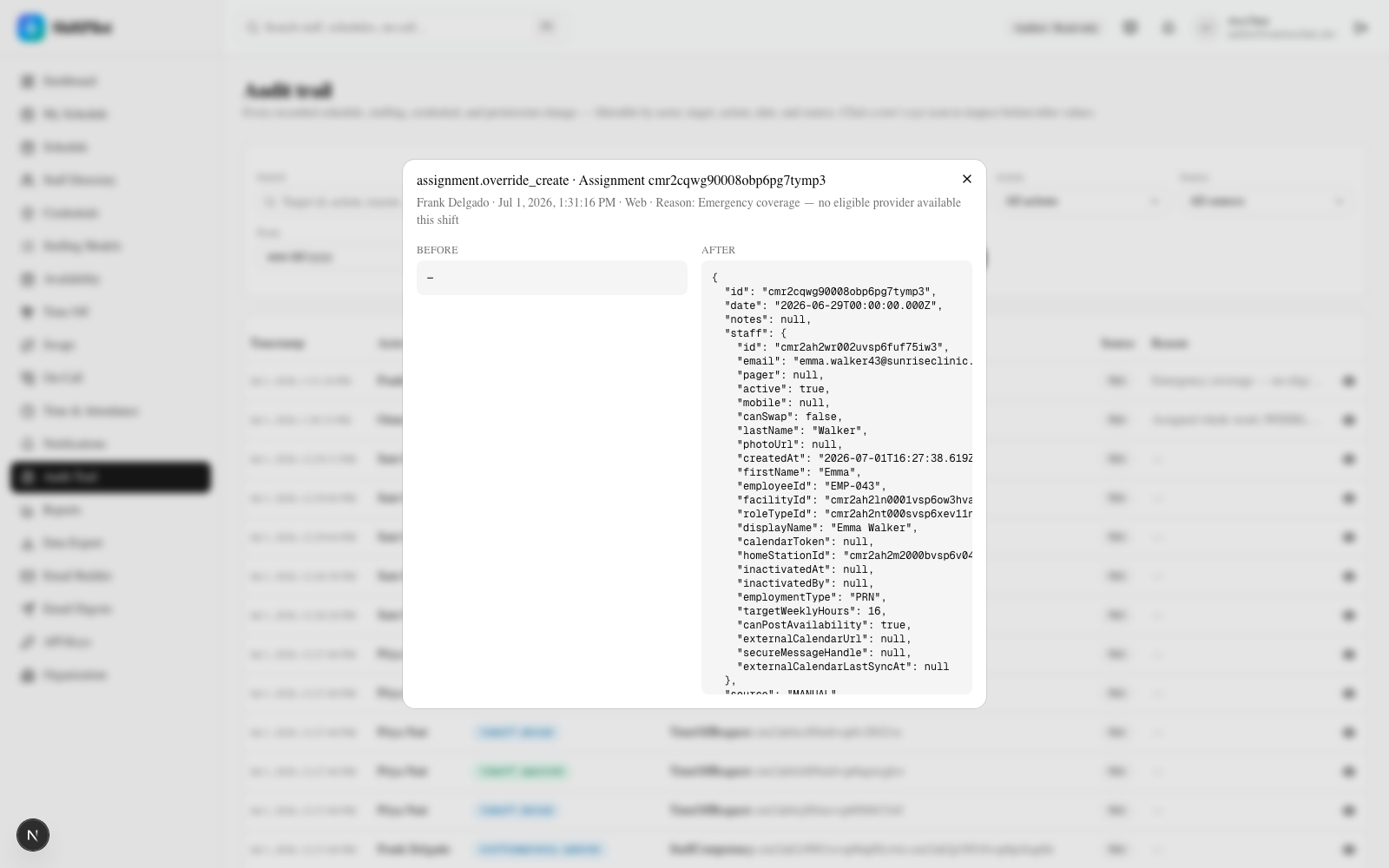
Click the eye icon on any row to open a dialog with the entry's full detail — actor, timestamp, source, reason,
and side-by-side before and after JSON snapshots of the target entity. For a create action (like the
assignment.override_create shown above) "before" is empty and "after" is the full new record; for an edit,
both sides are populated so you can see exactly what changed.
Export
Export CSV (this page) downloads the currently loaded page of results (up to 50 rows, matching whatever filters are active) as a CSV, including the raw JSON of the before/after values in their own columns. To export a larger or differently-shaped slice of the audit log, use the Audit Log dataset in the Data Export & Report Builder below, which isn't capped to one page.
Reports
/reports is the fixed, pre-built report catalog — the set of standard operational and compliance reports every
clinic needs, each with its own date range or mode filter and a one-click CSV export. Contrast this with
Data Export & Report Builder, which is ad-hoc and user-configurable; the report
catalog is curated and consistent, always showing the same shape of data the same way.
| Tab | What it shows |
|---|---|
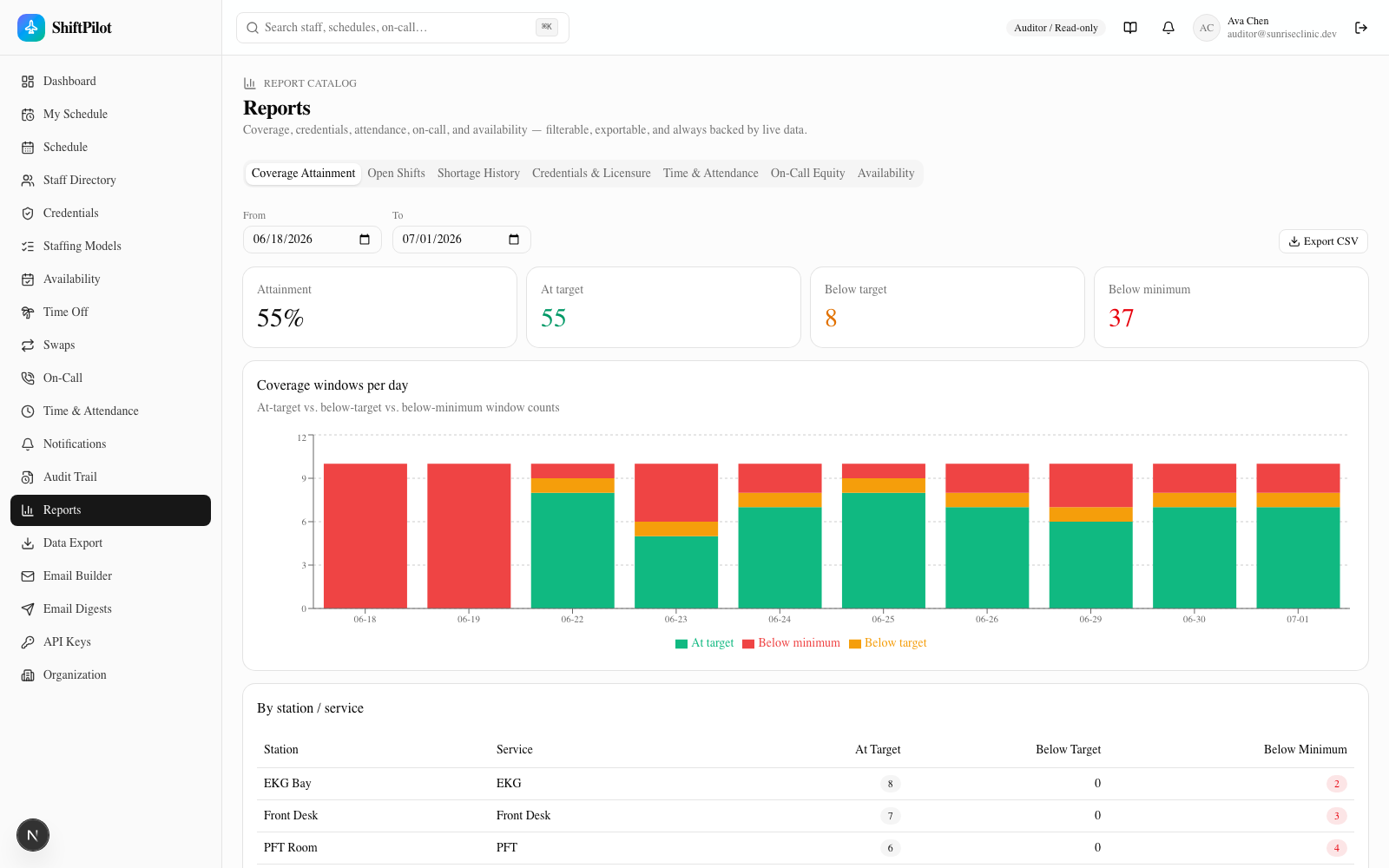
| Coverage Attainment | Attainment % and at-target / below-target / below-minimum window counts over a date range, charted by day and broken out by station/service |
| Staffing Hours | Shift count, scheduled vs. worked hours, overtime, differential, on-call, and leave hours over a range — with optional estimated labor cost (see below) |
| Open Shifts | Open (unfilled) shifts in range |
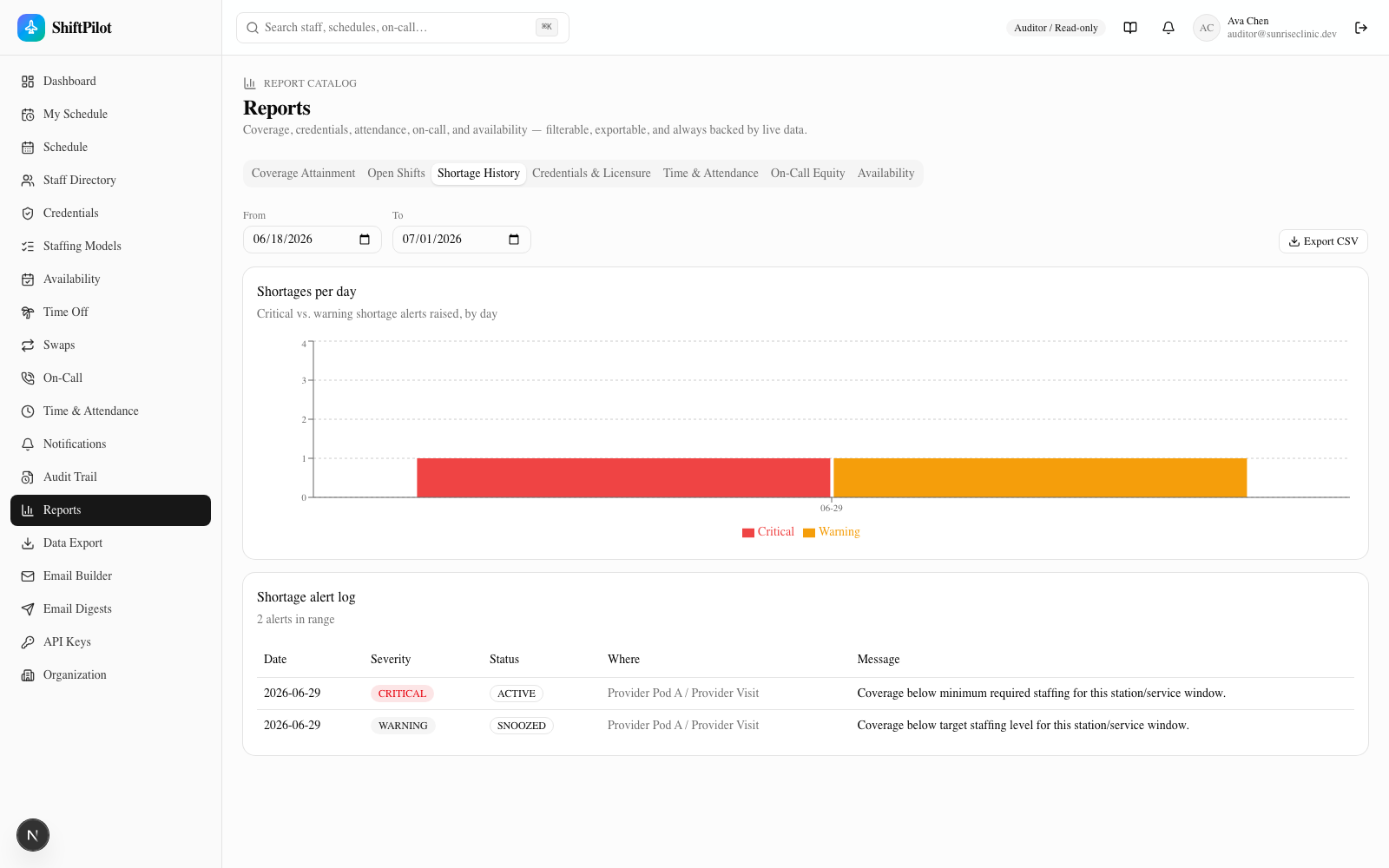
| Shortage History | Every coverage-shortage alert raised in range, critical vs. warning, charted by day plus a full alert log |
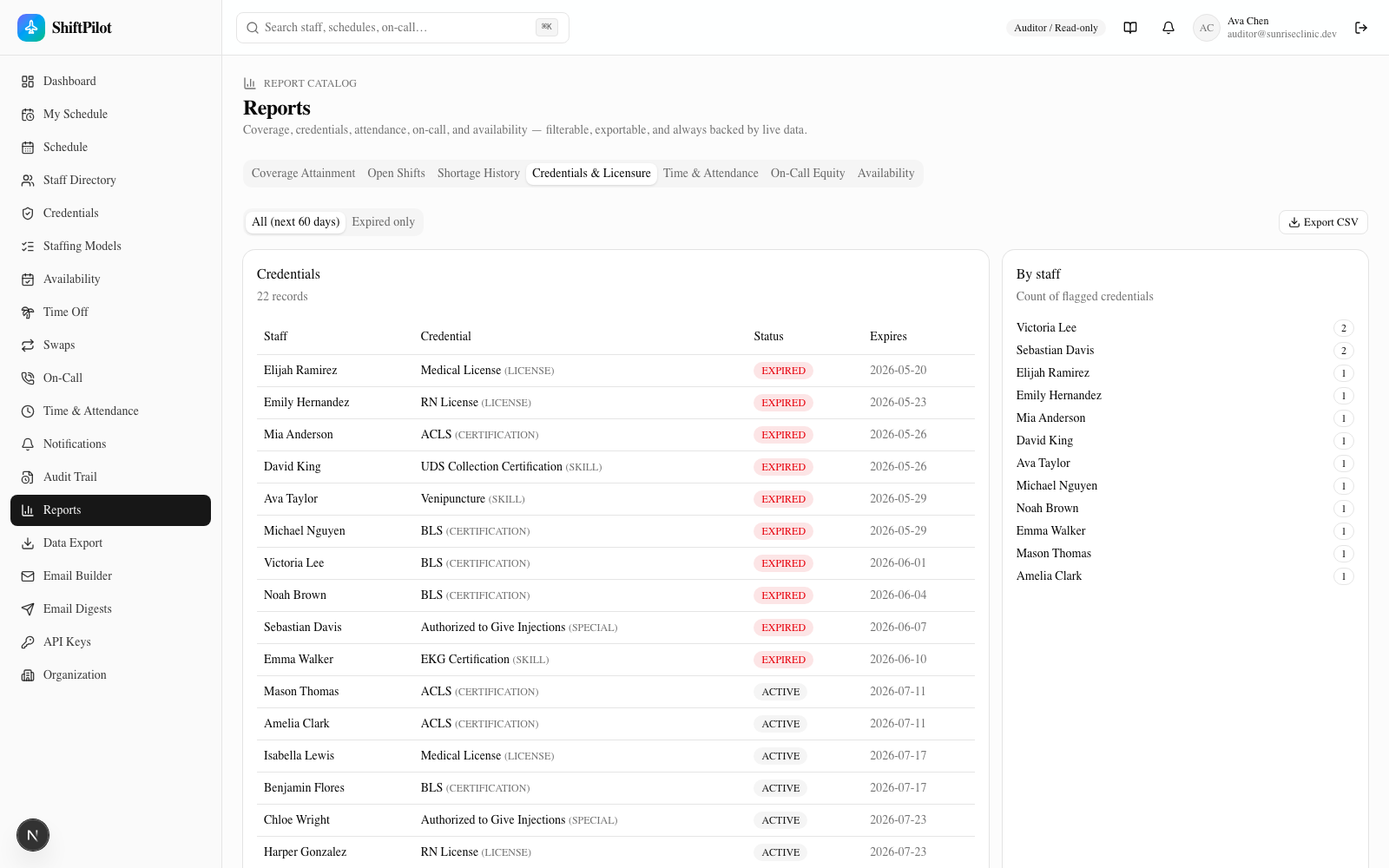
| Credentials & Licensure | Credentials expiring within 60 days (or expired-only), with a per-staff flagged-credential count |
| Time & Attendance | Scheduled-vs-actual and attendance-exception trends |
| On-Call Equity | Call distribution across providers — the on-call fairness/equity view |
| Availability | Availability add/remove activity over a date range |
Staffing Hours — group a date range by facility, department, staff, or role and see shift count, scheduled vs.
worked hours (worked is timecard-derived, with a scheduled-only marker where punches are missing), overtime,
differential, on-call, and leave hours. A Show est. cost toggle appears only if you hold the
VIEW_LABOR_COST_REPORTS capability — and then adds regular/OT/differential/total cost columns (a per-staff
rate column additionally requires VIEW_COMPENSATION). The server decides which columns exist in the response,
so nothing cost-related reaches a caller who lacks the capability; accessing cost is audited. See
Compensation & Labor Rules for how the numbers are estimated.
Two representative examples:
Coverage Attainment — with six weeks of seeded assignment data carrying deliberate shortages and overstaffed windows, this report renders real gaps: in the run below, attainment sits at 55%, with 37 below-minimum windows concentrated on the two earliest days in range and specific stations (EKG Bay, Front Desk, PFT Room) showing repeat below-minimum counts.
Shortage History — the alert log behind those coverage gaps, filterable by the same date range, showing severity, status, and the exact station/service each alert was raised for.
Credentials & Licensure is worth calling out too, since it's the report most directly tied to the eligibility engine described in Getting Started — every expired credential shown here is one the eligibility engine would already be blocking on the schedule grid.
Every tab has its own Export CSV button that downloads exactly what's on screen for the current filter/date range.
Data Export & Report Builder
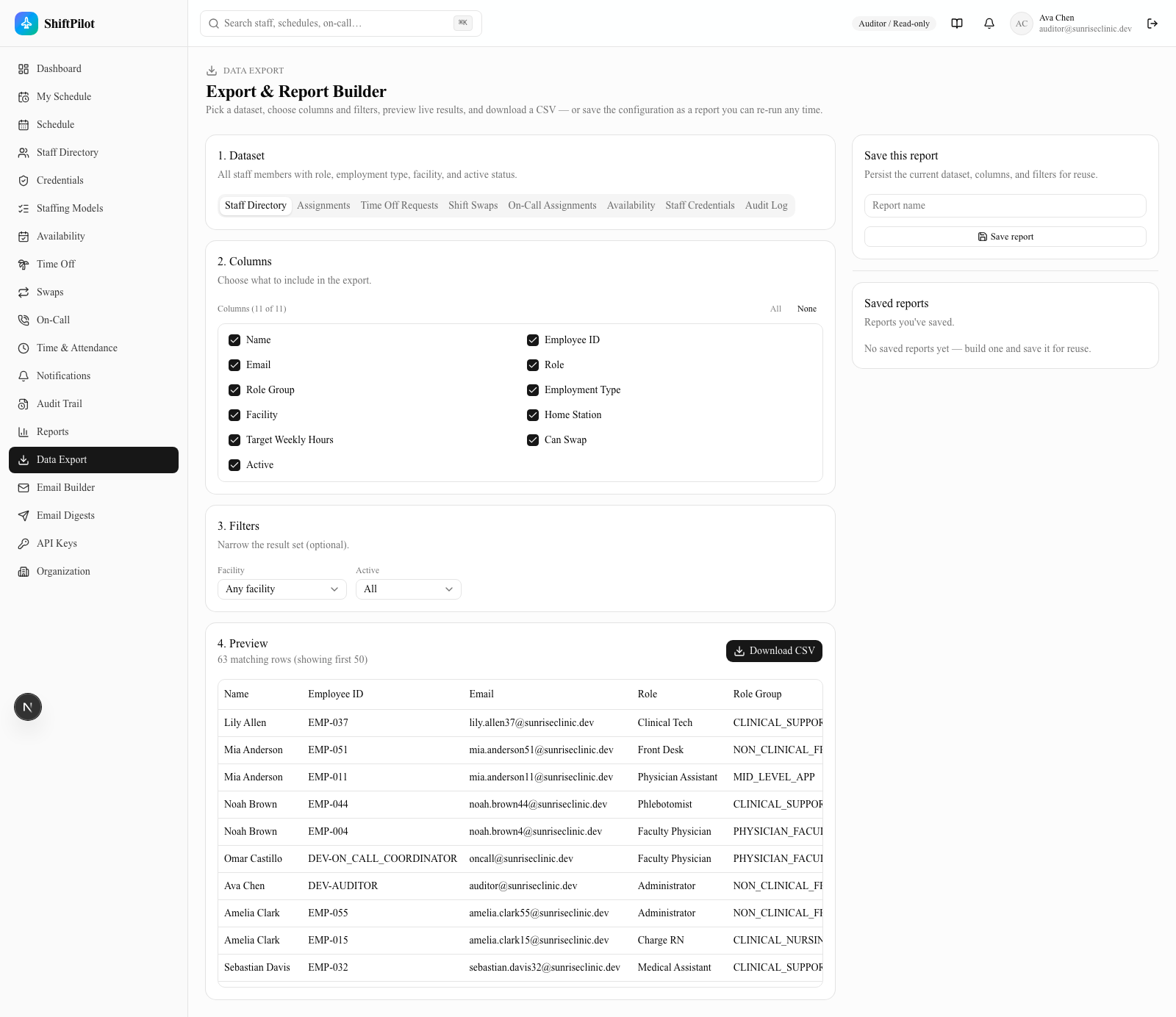
/data-export is the opposite of the fixed report catalog above: instead of a curated set of pre-built reports,
it's a general-purpose query builder over eight datasets — Staff Directory, Assignments, Time Off Requests,
Shift Swaps, On-Call Assignments, Availability, Staff Credentials, and Audit Log. Use it whenever the question
you're answering doesn't map to one of the fixed reports, or you need a wider/narrower column set or a one-off
filter combination.
The workflow is four steps, all live:
- Dataset — pick one of the eight tabs. Each has its own description, column set, and available filters.
- Columns — check/uncheck which columns to include (a Staff Directory export doesn't need to carry every field if you only want names and role groups).
- Filters — dataset-specific: date range, facility/department/station, status, type, or active/inactive, depending on what the dataset supports.
- Preview — a live, debounced table of matching rows (capped for display; the total match count and a "showing first N" note tell you if it's truncated) updates automatically as you change dataset, columns, or filters.
Download CSV exports the full matching result set (not capped like the preview) as a CSV with your chosen columns. Save this report persists the current dataset/columns/filters combination as a named, reusable report — saved reports show up in the sidebar for one-click reload later, and admins can see and load everyone's saved reports, not just their own.
Access is restricted: only System Admin, Enterprise Admin, Facility Admin, Scheduler, On-Call Coordinator, and
Auditor roles can reach /data-export — it's an oversight/reporting tool, not a general staff self-service
feature, so Provider/Staff and Charge/Lead accounts are redirected away from it.
Where to go next
- The engines that generate most of what shows up here → Getting Started
- The coverage shortages behind the Coverage Attainment and Shortage History reports → Scheduling Grid & Coverage
- The credential/competency data behind the Credentials & Licensure report → Staff, Credentials & Organization
- Real email delivery, calendar sync, and the public API → Email, Calendar & API
Delivery channels & mobile
Every subscription can be delivered in-app, by email (immediate or digest), or by SMS (Twilio — see the Email, Calendar & API section). The whole app is mobile-responsive and installable as a PWA, so alerts and approvals are actionable from a phone.